Wednesday, 28 March 2018

NARRATIVE SEQUENCE

This is my final narrative sequence. I used a scrabble board and wrote a small message in each different shot. This is the contact sheet of all the 72 frames. I set up the shoot with a scrabble board placed on a table, then I had the tripod set up above the board with the camera facing downwards. I shot all these photos in camera Raw and slightly adjusted the exposure and contrast to make the scrabble board more visable. After I exported all the photos to jpeg, I then resized all the photos to smaller jpeg so that photoshop was able to handle the the large amount of photos. Once I imported all the photos into a stack in photoshop, I then made sure the timeline was accessable then got all the photos into the timeline. Because the photos go reversed I had to rearrange them for obvious reasons and had it play on repeat. 

the link to the video of the narrative sequence is linked below


Sunday, 18 February 2018

SEQUENCE OF DECAY

For my sequence of decay I decided to shoot an ice cream melting. As you can see the two photos below are the beginning and end of the sequence. Firstly, I'm really not happy with the camera quality, even though I did use my Nikon DSLR, the lens that I used was 18-55mm zoom lens as I wanted a close up shot. However, using this lens doesn't produce the best images unlike my 35mm lens. Next time I shoot this sequence I'm going to make sure that I use my 35mm lens to get the best photographs from it. I did shoot this sequence as RAW files and then edited them all together in Photoshop Camera RAW. When editing them I decided to make the temperature a little cooler to get that blue undertone. I also adjusted the shadows, highlights, contrast, saturation and clarity make the image look better and bolder overall.

The next thing that went wrong was the fact that I didn't have a automatic timer to set the shutter off on the camera, so I had to manually take the photos in 1 minute intervals. Because I had to manually take the photos, I didn't realise until I imported the photos to make the GIF that every time I took the photo, the camera moved slightly making each shot in a slightly different position which mucked up the overall look of the GIF as the photo frame wasn't in the same place. So for the next time I shoot this sequence, I need to make sure that I have a timer to automatically set of the shutter or to properly secure the tripod so that the camera doesn't move with each shot. I decided to do an ice cream melting because, it showed a fast decay from it being frozen to melted and lost all shape and form in 30mins.


The link to the ice cream melting is below

https://www.youtube.com/watch?v=HcuEI2J_izo

Second Attempt at my Sequence of Decay

This is my second attempt my sequence of decay to try and improve from my melting ice cream sequence. The set up for this sequence was my Nikon D3100 equipped with the 35mm lens. The camera was then attached to a tripod with the camera facing down towards the bunch of unopened flowers. For the next 2 weeks everyday I took a photo of the flowers as they opened up to the end of them wilting and dying. Then once I had all the shot I needed I imported them into camera Raw in Photoshop and saved them as jpeg photos as the NEF files are too large to put into a GIF file. I did this to show the small changes that happens during flowers opening up to dying.


the link to the flowers blossoming is below

https://www.youtube.com/watch?v=KEUlk3pyAy4


Thursday, 8 February 2018

HIGH SPEED PHOTOGRAPHY

This was the set up for the high speed photography that we did yesterday. We had a tripod for the camera that had a macro lens on it. Then three tripods with the trigger and light connected to it. We then had a bowl of water to drop the plum in to. What we had to do was have someone ready to drop the plum from the height of the rolled brown paper. Then you also need someone on the camera ready to take the 5 sec exposure and ready to tell the person dropping the plum when to drop it. Then you also needed someone on the flash trigger resetting it for the separate shots. Below are some of the best photographs from the shoot that day.


We used a bowl of water and dropped an apple into it to created the big splash. We used a massive set up for this shoot with a large DSLR camera with a large zoom lens also with infrared triggers to set of the flash when the apple goes through it. The camera is set on a 10 second exposure time so that the camera doesn't miss the shot. The room is pitch black so when the flash goes off the camera only captures the moment when the splash happens. 


Wednesday, 31 January 2018

ADOBE AFTER EFFECTS/GIF FILE

This is my final GIF file that I created
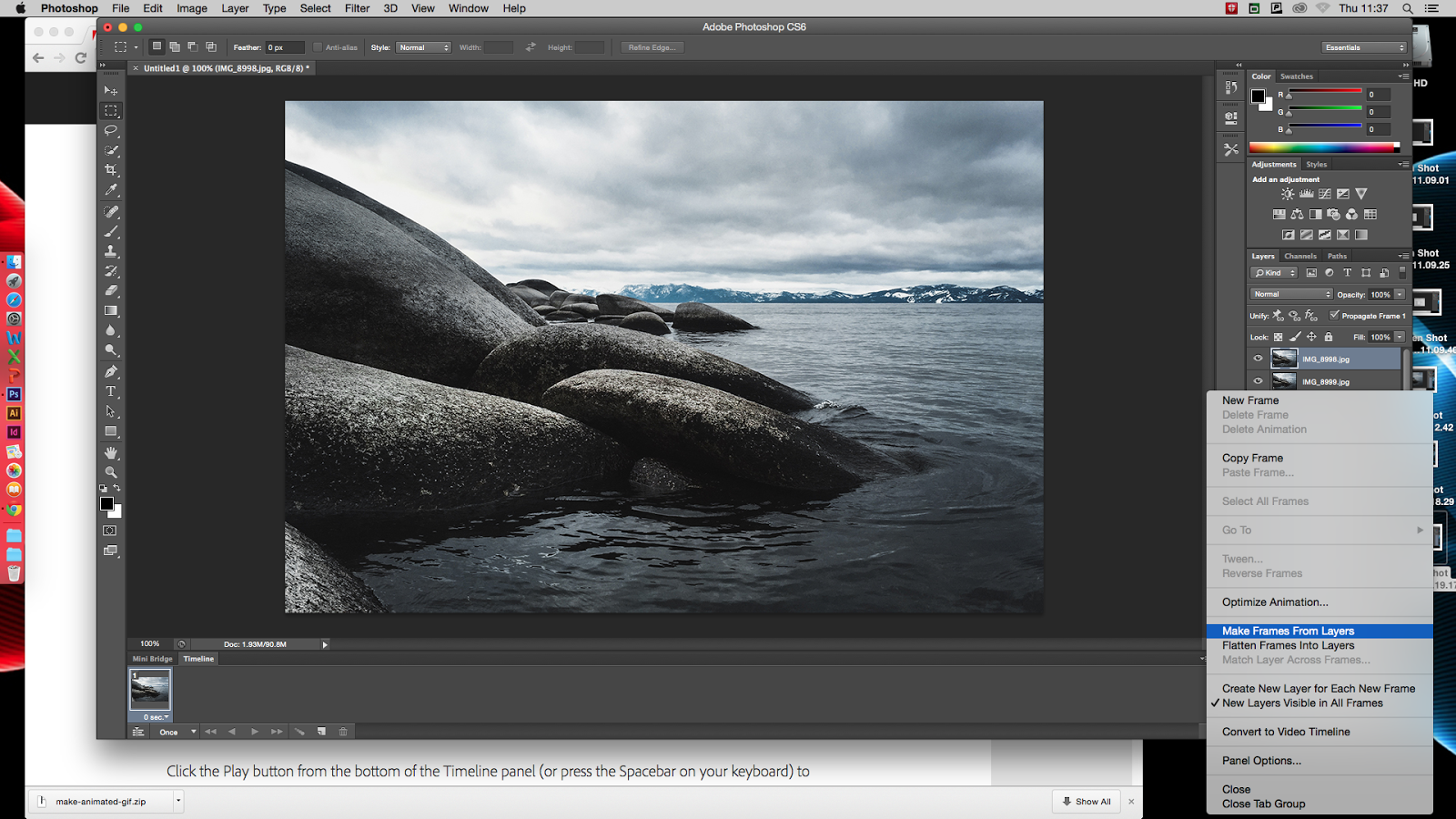
The first step into making a GIF file is to import all your photos into photoshop. Once you open all your files they will open as layers. Then go to window, then select timeline and a bar will appear at the bottom of the page. Select the bar that says create video timeline and change it to create frame animation. 


In Adobe after effects I created this small animation of a plane moving in the sky. 

Below is a screenshot of the layout of what inside Adobe After effects looks like. When creating an animation you first need to go into Photoshop and create two different layers, one for the background of the sky then a second of the cutout of the plane. Then save the file to your computer but make sure the layers are able to be edited in After Effects.

Then open After Effects and import your photoshopped image. Where you can see the image click the small arrow to show all the separate layers then drag the sky/background layer into the timeline. Once its in the timeline press the drop down arrow to transform and then press the arrow next to that until you can see the position and scale adjustment. Make sure your at the start of the timeline and click the symbol next to the position. Then make the size of the sky bigger than the frame and drag it to the side slightly. Once you've done this then drag the yellow arrow in the timeline to end of the time, mine was around 15seconds and then drag the sky slightly to the other side just so that when the animation is playing the sky looks realistic as its moving slightly. Once you've adjusted the sky, drag the plane layer into the timeline and place it above the sky layer. From here drag the plane to where you want it to be in the frame. Doing the same steps as the sky in transformation you want to make a keyframe for at the start for the plane to have the size you want, then the end of the timeline you wanna make the second keyframe of the plane smaller than the beginning to make it look as if it's heading of into the sky.


This is the link to my after effects file.

Monday, 29 January 2018

EDWEARD MUYBRIDGE / EARLY SEQUENCES OF HORSES

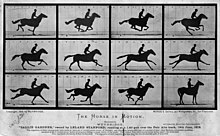
Edweard Muybridge was born April 9, 1830 and died May 8, 1903 and was an English photographer important for his pioneering work in photographic studies of motion, and early work in motion-picture projection. At the age of 20, he emigrated to America as a bookseller, first to New York, and then to San Francisco. In 1860, Muybridge was a successful bookseller and he left his bookshop in care of his brother while he was to go and sail back to England to buy more antiquarian books. However, he missed the boat and instead left San Francisco in July 1860 to travel by stagecoach over the southern route in Saint Louis, by rail to New York City, then by boat back to England. However, in central Texas, Muybridge suffered severe head injuries in a violent runway stagecoach crash which injured every passenger on board and even killed one person. Muybridge was quickly removed form the vehicle but hit his head on a rock or on another hard object. He was taken 150 miles to Fort Smith, Arkansas, for his treatement. He stayed here for three month, recovering from symptoms like double vision, confused thinking, impaired sense of taste and smell etc. Shortly after staying here he went to New York City, where he continued in treatment for nearly a year before being able to sail to England.

During his time recuperating in England he took up professional photography, learning the wet-plate collodion process, and secured at least two British patents for his inventions. He went back to San Fransisco in 1867, and in 1868 his large photographs of Yosemite Valley made him world-famous. In 1875 he travelled for more than a year in Central America on a photographic expedition. In the 1880s, he entered a very productive period at the University of Pennsylvania in Philadelphia, producing over 100,000 images of animals and humans in motion, capturing what the human eye could not distinguish as separate movements.

Muybridge spent his later years giving public demonstrations and teachings of his photography and early motion picture sequences, travelling back to England and Europe to publicise his work. He also edited and published compilations of his work, which greatly influenced visual artists and the developing fields of scientific/industrial photography. In 1894, he returned back to England permanently, then shortly in 1904, the Kingston Museum was opened in his hometown and contained a collection of his equipment.

In 1872, the former businessman and race-horse owner, hired Muybridge for some photographic studies. He had taken a position on a popularly debated question "whether all four feet of a horse were off the ground at the same time while trotting." In 1872, Muybridge began experimenting with an array of 12 cameras photographing a galloping horse in a sequence of shots. The human eye could not break down the action at the quick stride of the trot and gallop. Up until this point of discovery, most artists painted horses at a trot with one foot always on the ground, and at a full gallop with the front legs extended to the rear, and all feet off the ground. So Muybirdge was hired to prove this question. Between 1878 and 1884, Muybridge perfected his method of horses in motion, proving that they do have all four hooves off the ground during their running stride. In 1872, Muybridge settled Stanford's question with a single negative showing the horse airborne at the trot. 

Thursday, 18 January 2018

JUSTIN QUINNELL RESEARCH / ANALOGUE / 3 MONTH EXPOSURE

Justin Quinnell was known for his pinhole photography and recently worked as the Pinhole consultant for the movie "The Brothers Bloom" and his cameras are featured in the film. When he was younger, around the age of 4 he had several operations on his eyes as he had a problem with them. He said that he had a patch of one of his eyes with a tiny whole to look through. In addition, in a not very wealthy part of Bristol, he was the head of the photography department. Due to the kids and their parents didn't have the money to spend on a camera, so he got them to make a camera out of their drink cans and he really loved the idea.

This is the final outcome of my lumin pinhole camera, that was exposed for 3 months. What I did was, I stuck it outside my window of my house and it was east facing. As you can see it worked very well and you can see the light trails of the sun rising over for the three months. You can also see some detail in the image from the trees etc. 


Then once I had taken a photo of the pinhole outcome I imported them onto my computer and opened it into photoshop. Then in photoshop I inverted the photo so that the blacks become white and white becomes black. Doing this brought out the detail in the photo and now you can see the trees and theres some slight detail in the other surroundings.


Thursday, 4 January 2018

MAKING GIF FILES INTO PHOTOSHOP

This is my final GIF file that I created
The first step into making a GIF file is to import all your photos into photoshop. Once you open all your files they will open as layers. 


Then go to window, then select timeline and a bar will appear at the bottom of the page. Select the bar that says create video timeline and change it to create frame animation. 


Wednesday, 3 January 2018

SAM TAYLOR-WOOD JOHNSON RESEARCH / SEQUENCES OF DECAY

Sam Taylor - Johnson was born in London in 1967 and is splitting her time between London and Los Angeles. At the age of 16, she enrolled in an art college in Hastings, later moving back to London to attend Goldsmiths College. She was originally a sculpture, but began working in photography, film and video in the early 1990s. Sam Taylor Wood has had many group and solo exhibitions including the Venice Biennale in 1997, where she won the Illy Cafe Prize for Most Promising Young Artist and was nominated for the Turner Prize in 1998. Sam Taylor Johnson is regarded as one of the most important female contemporary artists and her work combines elements of the still life and moving image. 

Sam Taylor Johnson's 'Still Life' 2001 was one of the classical still life but described as an 'Updated in this exquisite, simple meditation on morality and beauty. This addition of a supermarket peach and a Bic pen prompts questions about modern attempts at immortality.

HAROLD EDGERTON RESEARCH / SEQUENCES OF MOVEMENT

Harold Eugene Edgerton was born on April 6, 1903 and he died January 4, 1990 aged 86. He was a Professor of Electrical engineering at the Massachusetts Institute of technology. Here is largely credited with transforming the stroboscope from an obscure laboratory instrument into a common device. He also was deeply involved with the development of sonar and deep sea photography, And his equipment was used by Jacques Cousteau in searches for shipwrecks and even the Loch Ness monster. Edgerton was born in Fremont, Nebraska, he is the son of Mary Nettie Coe And Frank Eugene Edgerton, A descendent of Richard Edgerton, One of the founders of Norwich, Connecticut And they descendant of Gov William Bradford (1592-1657) of the Plymouth Colony and a passenger on the MayflowerNow. His father was a lawyer, journalist, author and orator and served as the assistant attorney general of Nebraska from 1911 to 1950. Edgerton grew up in Aurora, Nebraska but he also spent some of his childhood years in Washington DC and Lincoln, Nebraska. 

In 1937 Edgerton became a known photographer who used stroboscopic equipment, in particular, multiple studio electronic flash units, to produce these stunning photographs, many of which appeared in Life Magazine. When taking multi flash photographs this strobe light equipment could use flash up 120 times a second. Edgerton was a pioneer in using short duration electronic flash and fast events photography, subsequently using this technique to capture images of balloons at different stages of the bursting, a bullet during its impact on an apple, or using multiflash to track the motion of a devil stick, for example. Edgerton is equally recognised for his visual aesthetic, many of the striking images he created in illuminating phenomena that occurred to fast for the naked eye adorn art museums worldwide. His high-speed stroboscopic short film Quicker'n a Wink won an Oscar in 1940. 

Edgerton remained active throughout his later years and was seen on the MIT campus many times after his official retirement. Unfortunately he died suddenly in January 4, 1990 at the age of 86 and is buried in Mount Auburn Cemetery, Cambridge, Massachusetts.


Harold Edgerton Milk Drop Coronet, 1934 20 x 16 inches (50.8 x 40.65 cm) gelatin silver print signed in pencil on the reverse

Milk Drop Coronet, 1934
20 x 16 inches
Gelatin silver print

I really like the simplicity of Edgerton's Photographs, for example this famous Milk Drop photograph. The splash of the milk has create a sticking shape as the droplets have risen in the air but almost looks semetrical all the way round making the image look very unique. I also think that this photograph looks as if it follows a certain art design/movement. 

The image below is my take on of the Milk Drop instead we just used a bowl of water and dropped an apple into it to created the big splash. We used a massive set up for this shoot with a large DSLR camera with a large zoom lens also with infrared triggers to set of the flash when the apple goes through it. The camera is set on a 10 second exposure time so that the camera doesn't miss the shot. The room is pitch black so when the flash goes off the camera only captures the moment when the splash happens. 

Wednesday, 6 December 2017

CHAOS FILM /MARTIN HENSON

Martin Henson was born in 1952 in a place called Adel Mill Farm in West Yorkshire, here he was brought up with all his family. He now lives in a place called Otley a small market town in Wharfedale that is also in West Yorkshire. Because he works from home he has himself a digital darkroom and he does all his processing and printing of images in there. He had his first camera brought when he was 12 years old and it was a Kodak 120 roll film. It was a baker light box camera, with a fixed lens and leaf shutter. It took large negatives and he described it as a 'hit and miss quality' camera, however, it got him started photography. 

He said that his 'first claim to fame' was when he won first prize in the Leeds show and it gave him inspiration to enter more competitions. He said that he's won various competitions over the years but mainly in black and white. Martin Henson had pictures published in nearly every popular photo magazine on the market. He first started in black and white developing and printing, slowly moving to colour, however, he was always drawn back to monochrome as the preferred medium and he said that black and white looks 'simple but effective, dramatic not garnish, and for landscape can't be beaten'. All the pictures on his website were taken over the last few years and he decided to launch his website to show the area around where he lives. 90% of the pictures were taken within a 25 mile radius of where he lives and he intended to shoot lots more and make this website one of the biggest monochrome only landscape websites in the UK. 

'Whilst trekking the hills, dales and moors I have become more aware of the landscape we live in. We don't own it nor do we dictate to it, nature will do what it has to in the most spectacular ways, I am humbled by its power and beauty, I have witnessed amazing light shows, wondrous cloud formations, nature living in complete harmony equipped to cope with the elements, we as humans feel powerful in this technological age but out there we are just another part of life's cycle a gain of sand in a vast arena. I try to capture this sense of power and scale in my images not as the camera sees it but my own interpretation through inspiration on being a witness to events I have been privileged to see.


IVY STUDY

I really like how the edges of the photograph has got a bit of vignette, I think it makes the centre of the image look highlighted and more illuminated. You can really see the detail and the texture in the leafs. The leafs look almost like satin fabric and I like all the small little lines on the leaves.


HOLY LEAFS

I like the vignette on the photograph and I also really like how shiny the holy leaves are. I also think that the aperture on the photograph creates a very elegant look. You can see the texture in the leaves from all the small lines showing definition in the leaves. 


ROSE

I like how to main focus of the photograph is the flower and having the flower in the foreground to be a different colour to the background leaves makes the flower look more bold and centred. The vignette in the photo also make the flower look a lot more highlighted and spotlighted.


FLOWER STUDY

I really like how your eye gets attracted to the centre of the photo. The photograph also has a vignette making the flower look more emphasised. In addition, having the aperture being quite low makes smaller areas in focus being able to fully focus on the flowers and blur out the background. 

Thursday, 30 November 2017

CHAOS DIGITAL /MARTIN ROEMERS RESEARCH

Martin Roemers was born in August 21st, 1962 in Oldehove, Netherlands. He is a Dutch photographer and artist. He studied at the aki ACADEMY of Visual Arts in Enschede, the Netherlands and graduated in 1991. For many years, he has worked on long-term projects that result in exhibitions and books such as Relics of the cold War, Kabul and The Eyes of War. His latest project is Metropolis, an exploration of the world's megacities. Martin Roemers' work has been exhibited throughout Europe, America, Asia and Australia. His work is represented in prominent public, corporate and private collections, among them the Rijksmuseum in Amsterdam, the Ford Foundation in New York and The Museum and The Museum of Fine Arts in Houston, Texas. Martin Roemers has written two books, one in 2007 called Final Days of Production and another in 2012 called Martin Roemers: The Eyes of War. This book was about him taking portrait photographs of thousands of people who had lost their eyesight as children or young soldiers during the Second World War. This book features around 40 portraits of war victims from Germany, Great Britain, the Netherlands, Belgium, Ukraine and Russia. 


Martin Roemers, (2014), Piccadilly Circus, City of Westminster, London, United Kingdom [ONLINE]. Available at: http://www.martinroemers.com/work.php?serie_dir=02Metropolis:%20AFRICA,%20AMERICAS,%20EUROPE&nr=2 [Accessed 30 November 2017].
METROPOLIS: AFRICA, AMERICAS, EUROPE

This collection of work was taken with a long exposure from elevated positions so that he could get a perspective looking down and to at the scenery. Martin Roemers created these photographs using a large-format analogue cameras and film. The images that he has created has the movement blurred but all the images are in focus. 'Just over a century ago 13% of the worlds population lived in urban centres, the United Nations predicts that by the year 2050, close to six billion people - 75% of the global population - are expected to be concentrated in cities. The UN has also designated that 28 of these cities now meet their threshold of what constitutes a 'megacity' defined as urban areas with more than 10 million inhabitants. 

Globally, one in eight urban residents now live in a megacity and by 2030 it is predicted that there will be forty-one of these over-loaded metropolitan centres around the world. Martin Roemers has been fascinated by the vibrant energy and mix of cultures living amidst this chaos, inspiring him to create Metropolis (2007-2015), a collection of 85 photographs in which he portraits 22 megacities across five continents.'

Martin Roemers, (2014), Victoria Embankment, City of Westminster, London, United Kingdom [ONLINE]. Available at: http://www.martinroemers.com/work.php?serie_dir=02Metropolis:%20AFRICA,%20AMERICAS,%20EUROPE&nr=0 [Accessed 30 November 2017].
This is a piece of his work that was taken at Victoria Embankment in the City of Westminster, London, United Kingdom and was created in 2014. I really like how the slow shutter speed make the people looked blurred. I also love how the people are blurred but the background and buildings are in focus. This collection of his work consists mostly of slow shutter speed shots to show how populated these 'megacities' are.

Martin Roemers, (2014), Camden High Street, Camden Town, London, United Kingdom [ONLINE]. Available at: http://www.martinroemers.com/work.php?serie_dir=02Metropolis:%20AFRICA,%20AMERICAS,%20EUROPE&nr=3 [Accessed 30 November 2017].
This was taken in Camden High Street in Camden Town, London, United Kingdom and was created in 2014. I really like the position and composition of this shot because you have all the shops to the side of the image then all the out of focus blurred people in the lower part of the photo. I also really like how much colour is in the photograph because it makes it look bold and bright. The shops themselves are old and unique in colour but the different colour of clothing on the people add to the colour.

Martin Roemers, (2015), Jardins du Trocadero, XVIe Arrondissement, Paris, France [ONLINE]. Available at: http://www.martinroemers.com/work.php?serie_dir=02Metropolis:%20AFRICA,%20AMERICAS,%20EUROPE&nr=4 [Accessed 30 November 2017].
This photo was taken in Jardins du Trocadero, XVIe Arrondissement in Paris, France. He create this shot in 2015 to go along with the rest of his Metropolis collection.

Tuesday, 28 November 2017

ANALYSING A STUDENTS WORK

FIRSTLY, LIST 5 WORDS TO DESCRIBE THAT WORK?
The work is very colourful and intense. All the different colours make the image look very bold and bright making the image look very creative and interesting. The light trails also make the image look very unique.

WHAT IS THE MEDIUM OF THE WORK?
The medium of the work is a portrait digital pigment print.

WHAT KIND OF SHAPES OR FORM CAN YOU FIND?
I can see lots of lines from the light trails. 

WHICH TECHNIQUES HAVE THEY USED?
They have used layering in photoshop to layer the light trails photo over the top of the portrait photo. Also I can see the use of rule of thirds in the photo because you naturally look in one of the golden sections. 

HOW DOES THE WORK MAKE YOU FEEL?
The work gives off a happy and uplifting atmosphere from the rich and vivid colours. 

Thursday, 16 November 2017

MULTIPLICITY

Using photoshop I created both these images of multiplying/cloning the subject person. I shot these images set up in camera RAW but didn't adjust the image until they all were layered so that I could make them all the layered images look the same. 

When I went out to take the pictures, I made sure that I had an interesting background so that there was something interesting behind the subject. I shot the images with a tripod so that the frame was the same the whole time. I got the subject to change their position and move along the frame once I had focused and taken the photo. Once all the photos were taken, I then imported them into my computer and opened the into camera RAW. However, I didn't adjust any of the photos until they were altogether and I could adjust them all to still look the same. Once they were all opened into Photoshop I copied the second photo onto the first photo. 

So once all the images were opened up in Photoshop, I then copied one of the other images with the person in a different place and layered the image. I added a mask layer and erased part of the top layer to reveal the person below.


Tuesday, 14 November 2017

HYPERLAPSE

When you open photoshop, go to the file menu and open the first image in your sequence. At the bottom of the dialogue box, click on the image sequence box. Having your files numbered consecutively it will help a lot. After choosing the first image and clicking on the sequence box, clicking open will import the images into Photoshop as a time-lapse video file. If there are gaps in the sequence, then there will be segments of the time-lapse video with a black screen. 

After opening the image, a box will pop up asking you to select a frame rate. If you click the dropdown arrow will reveal a number of options. Usually stick to 24 fps for the cinematic look however, the frame rate can be changed later on in the editing process so this step isn't majorly important. 

Opening the image sequence in Photoshop will create a video layer, which is indicated by the filmstrip icon on the layer thumbnail. In order to see the video clip, go to window menu and select timeline. In the timeline, you can customise the duration of the video clip, watch a preview, or even add still images, complete with transitions. 

After making all the video edits or even if you make no changes at all, you need to export the time-lapse video. To export the video, go to file, export, render video. 


NARRATIVE SEQUENCE

This is my final narrative sequence. I used a scrabble board and wrote a small message in each different shot. This is the contact sheet of...